The day, at a glance
Waiting, at risk, unassigned, overdue — the moment you sign in.
Reports in SM Gateway are built from the inbox, the contacts and the campaigns you already run — no setup, no spreadsheet.
See plans and pricingIncluded in every plan · Agent activity and chat logs on Professional and Enterprise
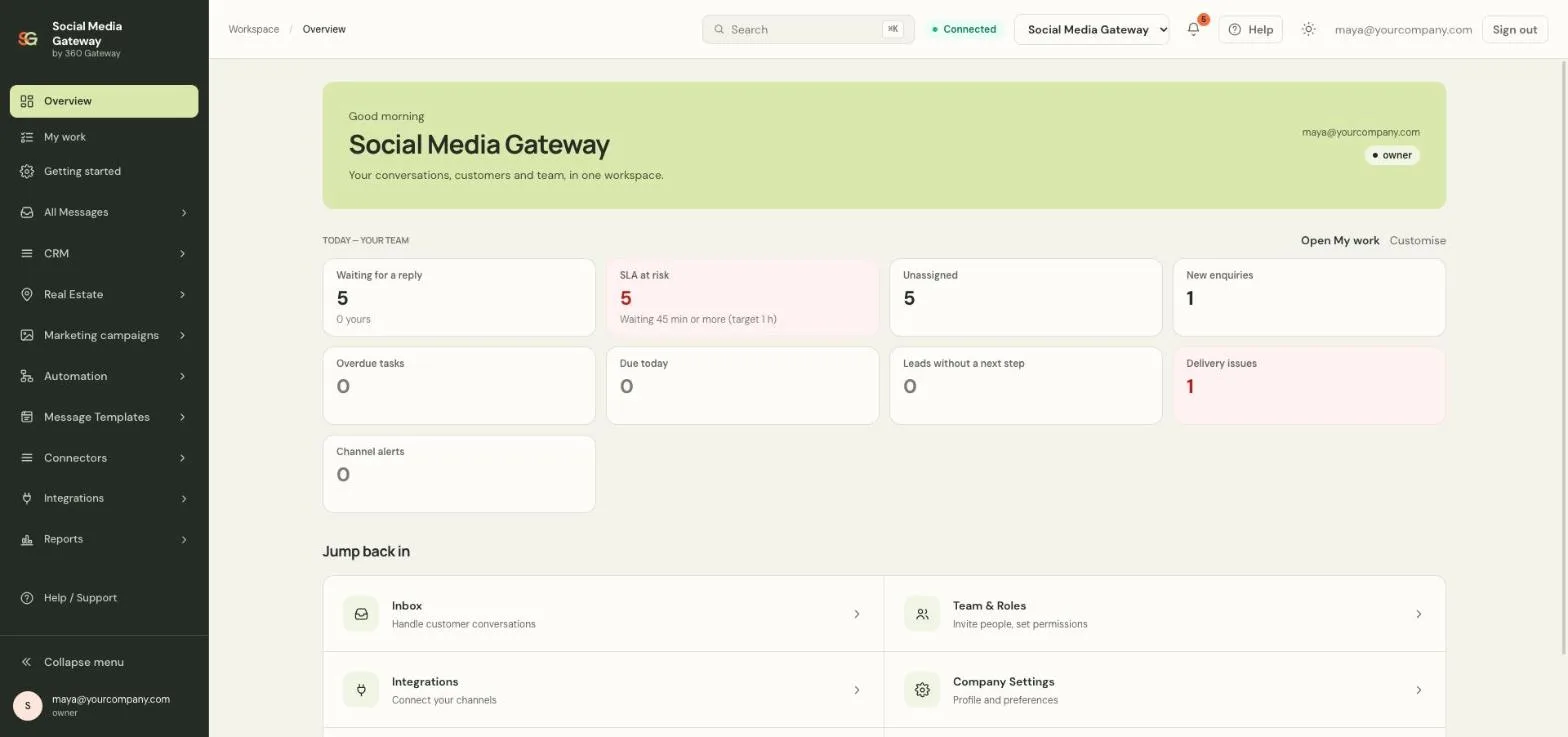
Waiting, at risk, unassigned, overdue — the moment you sign in.
Campaign cost, conversions and revenue from what customers actually did.
Views, reach, reply rate and the best time to post, from Meta’s data for your accounts.
Six tiles that tell the front desk what to do next.
Leads by stage and owner, conversion over time.
Engagement rate, follower change, comment reply rate, median first reply.
The Overview page opens on your team’s day: what is waiting, what is at risk and who is overloaded.
See who answered what and how fast, and read any conversation with its full history and notes.
Leads by stage and owner, so the pipeline stays honest.
Every campaign reports its real cost, the conversions it produced and the revenue recorded against them.
Views, reach, engagement rate, follower change, comment reply rate and median first reply for your Facebook Pages and Instagram accounts.
On request until Meta App Review completes
Failed and undelivered messages, template rejections and webhook deliveries are listed where the team can act on them.
Today’s workload is the home page of the application.
Agent activity, lead funnel, campaigns and social, each with export.
Assign, retarget, retry — every number links to the thing behind it.
Included in every plan · Agent activity and chat logs on Professional and Enterprise

Every report links back to the conversations, leads and campaigns behind it, so a number is never the end of the question.
Start free trial Illustrative photo. Interface details use sample data.No. They are built from the inbox, contacts and campaigns you already use.
Yes — chat logs, campaign reports and social reports export to CSV; the public API exposes conversations and messages.
Reports are on every plan; agent activity and chat logs on Professional and Enterprise; campaign results come with campaigns; social insights follow the Social Suite.
By plan — the history limit is set in the plan, and older metrics are deleted nightly.
Product screens are from the SM Gateway application with sample data. Cards and photos are illustrative.
Connect to our application’s chat service to speak with us. Chat may use browser storage to recognize your visit.
Read our privacy informationOther ways to contact us